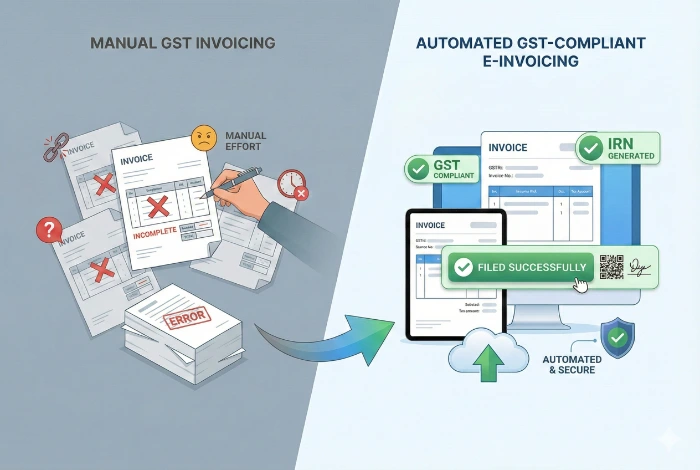
GST E-Invoicing Software with IRN and QR Code Generation
Saniiro E-Invoicing is GST e-invoicing software for Indian small and mid-sized businesses. It turns your regular Saniiro invoices into e-invoices, obtains the Invoice Reference Number (IRN) and signed QR code from the Invoice Registration Portal (IRP) and stores them with the invoice, which stays linked to billing, e-way bills, accounts and GST returns.
Why E-Invoicing Matters for GST-Registered Businesses
Without the right software, the e-invoicing process means copying invoice data into a portal, tracking IRNs in spreadsheets and matching them back to your books by hand. Saniiro E-Invoicing removes those steps.
Curbs Fake GST Invoices
Every e-invoice is registered on the IRP, which makes invoices easier to verify and harder to misuse.
Smoother ITC Claims
Registered e-invoice details auto-populate GSTR-1, helping your buyers match input tax credit (ITC).
Fewer Manual Errors
Saniiro builds each e-invoice from your existing invoice, so you don't re-key data on a portal.
Clear Audit Trail
The IRN, acknowledgement details and QR code stay with the original invoice for review.
Required Above the Threshold
E-invoicing applies to businesses whose turnover exceeds the threshold notified by the government.
Key Features of Saniiro E-Invoicing
E-Invoice from Any Sales Invoice
Generate an e-invoice from an invoice you have already created in Saniiro. The invoice data is converted into the government e-invoice format, so you don't prepare a separate file or upload it by hand.
IRN and Signed QR Code
Saniiro submits the invoice to the Invoice Registration Portal (IRP), which returns a unique Invoice Reference Number (IRN) and a digitally signed QR code. Both are saved and printed on the invoice, so your buyer can verify the e-invoice.
Bulk E-Invoice Generation
Select several invoices and generate their e-invoices in one action instead of processing them one by one. This saves time for businesses that raise many B2B invoices every day.
Validation Before Submission
Saniiro validates invoice data before submission, checking details such as GSTIN, HSN codes, tax rates and totals. Issues are flagged so you can fix them first, which reduces manual errors and rejected requests.
IRP Connection and Cancellation
Saniiro connects to the IRP through a GST Suvidha Provider (GSP) API, so you don't log in to a separate portal for each invoice. You can also cancel an e-invoice from Saniiro within the 24-hour window the government allows.
Audit-Ready Archive
Every e-invoice is stored in the cloud with its IRN, acknowledgement details and QR code. You can retrieve it any time for audits, reconciliations or buyer queries without keeping physical files.
How the E-Invoicing Process Works in Saniiro
Create the Invoice
Raise a GST invoice in Saniiro as usual, or open an existing one.
Validate and Submit
Saniiro validates the data and sends it to the IRP for registration.
Receive IRN and QR Code
The IRP returns the IRN and signed QR code, saved on the invoice.
Share and Report
Print or email the e-invoice; its data flows to accounts and GST reports.
How Saniiro E-Invoicing Connects to the Rest of Saniiro
- Generate e-invoices from the same invoices you raise in GST billing, with no re-keying.
- Create an e-way bill from the same invoice data when goods move.
- Invoice, tax and payment entries post to your accounts automatically.
- E-invoice data feeds GSTR-1 and GSTR-3B-ready reports.
- The IRN, QR code and invoice stay together for audits and buyer queries.
Saniiro E-Invoicing is part of one connected platform. It works with GST billing, e-way bills, accounting and GST compliance, so sales, stock, books and GST records share one database and you enter each invoice only once.
Frequently Asked Questions
Answers about IRN and QR code generation, eligibility, cancellation and GST reporting in Saniiro E-Invoicing. It works together with GST billing, e-way bills and GST accounting.
Saniiro E-Invoicing is GST e-invoicing software for Indian small and mid-sized businesses. It generates e-invoices from regular Saniiro invoices, validates the data, obtains the Invoice Reference Number (IRN) and signed QR code from the Invoice Registration Portal (IRP) and stores them with the invoice, which stays connected to billing, e-way bills, accounts and GST reports.
An e-invoice under GST is a B2B invoice whose details are registered on a government Invoice Registration Portal (IRP). The IRP validates the invoice, assigns a unique Invoice Reference Number (IRN) and returns a digitally signed QR code, which must appear on the invoice given to the buyer.
E-invoicing applies to GST-registered businesses whose aggregate annual turnover exceeds the threshold notified by the government, mainly for B2B supplies and exports. Check the currently notified threshold for your business. Saniiro E-Invoicing supports the e-invoicing process once your business falls within its scope.
Saniiro submits the invoice data to the Invoice Registration Portal (IRP) through a GST Suvidha Provider (GSP) API. The IRP returns the IRN, acknowledgement details and signed QR code, and Saniiro saves them with the invoice so you can print or email the e-invoice.
Saniiro E-Invoicing validates invoice data before submission, checking details such as GSTIN, HSN codes, tax rates and totals. It flags problems so you can correct them first, which reduces manual errors and rejected requests at the Invoice Registration Portal (IRP).
An e-invoice cannot be edited once its IRN is generated. Saniiro lets you cancel the e-invoice within 24 hours of IRN generation, the window allowed by the government, and issue a fresh invoice. After that window, corrections are made through a credit note or debit note.
Yes. Saniiro E-Invoicing lets you select multiple invoices and generate their e-invoices in one action, so businesses that raise many B2B invoices a day do not need to process each invoice separately.
Saniiro E-Invoicing shares one database with billing, e-way bills, accounting and GST reports. You can create an e-way bill from the same invoice, and e-invoice data flows into GSTR-1 and GSTR-3B-ready reports without re-entering it.
You can start a free trial of Saniiro E-Invoicing from the Saniiro website, or book a demo with the Saniiro team to see the e-invoicing process with your own invoices.
Get Started with Saniiro